LILYGO® T-Watch
The T-Watch is a wearable Meshtastic node with a touch screen, haptic feedback, a speaker and microphone, and a three-axis accelerometer.
Both boards share one firmware build and one hardware model. The Plus adds a GNSSGNSS (Global Navigation Satellite System). A multi-constellation satellite positioning receiver. Hardware listing GNSS support typically receives GPS, BeiDou, GLONASS and QZSS. receiver, a user button, and a larger battery.
- T-Watch S3 Plus
- T-Watch S3
T-Watch S3 Plus
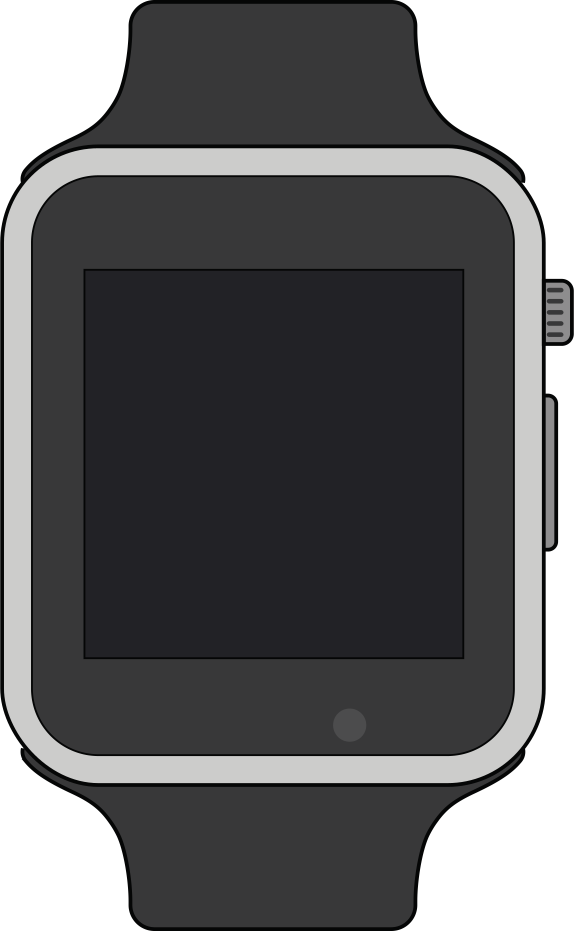
The T-Watch S3 Plus adds a GNSS receiver and a user button to the T-Watch S3, and carries a 940 mAh battery.
Specifications
- MCU
- ESP32-S3 (Wi-Fi & Bluetooth 5 LE)
- 16 MB flash, 8 MB PSRAM
- ESP32-S3 (Wi-Fi & Bluetooth 5 LE)
- LoRa Transceiver
- Semtech SX1262
- Frequency options
- 433 MHz
- 868 MHz
- 915 MHz
- 920 MHz
- Navigation Module
- GNSS receiver
- Display
- ST7789 TFT LCD, 240 x 240, touch
- Battery Capacity
- 940 mAh
- Antenna
- U.FL/IPEX antenna connector for LoRa
Features
- DRV2605 haptic driver.
- I2S speaker and microphone with MAX98357A amplifier.
- AXP2101 power management.
- BMA423 three-axis accelerometer.
- Real-time clock.
- User button, which the T-Watch S3 does not have.
Flashing
To flash ESP32-S3 devices like the T-Watch, place them in Espressif's firmware download mode. Use the "1200bps reset" button in the web flasher to do this. Where that does not work, follow the manual process in the following steps.
Do not proceed unless an antenna is connected to avoid possible damage to the device's radio.
- Press and hold the crown button to power the device off.
- Remove the device's back cover.
- Press and hold the boot button.
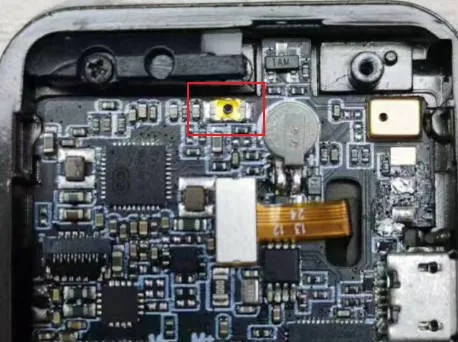
- While holding the boot button, press the crown button once to turn the device on.
- Release the boot button after two to three seconds.
The device is now in Espressif firmware download mode, and you can flash it with any of the supported methods. Use the Web Flasher and select "T Watch S3" from the device list.
Resources
- Firmware file:
firmware-t-watch-s3-X.X.X.xxxxxxx.bin - Purchase Links:
- International
T-Watch S3
The T-Watch S3 is a compact wearable device featuring a 1.54-inch IPS LCD touch screen with a resolution of 240x240 pixels. It includes haptic feedback, an integrated microphone, speaker, real-time clock, and a three-axis accelerometer. LILYGO® sells the T-Watch S3 Plus in its place, so this tab covers existing boards.
Specifications
- MCU
- ESP32-S3 (Wi-Fi & Bluetooth 5 LE)
- LoRa Transceiver
- Semtech SX1262
- Frequency options
- 433 MHz
- 868 MHz
- 915 MHz
- Display
- 1.54" ST7789V TFT LCD, 240 x 240, touch
- Battery Capacity
- 400 mAh
- Antenna
- U.FL/IPEX antenna connector for LoRa
- Connectors
- Micro-USB
Features
- DRV2605 haptic driver.
- I2S speaker and microphone with MAX98357 amplifier.
- AXP2101 power management.
- BMA423 three-axis accelerometer.
- Real-time clock.
- No GNSS receiver.
Flashing
To flash ESP32-S3 devices like the T-Watch, place them in Espressif's firmware download mode. Use the "1200bps reset" button in the web flasher to do this. Where that does not work, follow the manual process in the following steps.
Do not proceed unless an antenna is connected to avoid possible damage to the device's radio.
- Press and hold the crown button to power the device off.
- Remove the device's back cover.
- Press and hold the boot button.
- While holding the boot button, press the crown button once to turn the device on.
- Release the boot button after two to three seconds.
The device is now in Espressif firmware download mode, and you can flash it with any of the supported methods. Use the Web Flasher and select "T Watch S3" from the device list.
Resources
- Firmware file:
firmware-t-watch-s3-X.X.X.xxxxxxx.bin