Convert RAK4631-R to RAK4631
The only difference between the RAK4631-R (RUI3) and the RAK4631 (Arduino) is the bootloader it is shipped with - the hardware is the same.
Meshtastic requires the Arduino bootloader on RAK WisBlock nRF52nRF52A microcontroller chipset made by Nordic, used by several devices such as the RAK Meshtastic Starter Kit and the Lilygo T-Echo. Lower power usage than ESP32.-based boards. The process of converting the bootloader only needs to be performed once.
Here are two ways to flash the bootloader:
USB Device Firmware Upgrade (DFU)
- Install Python
- Install adafruit-nrfutil
pip3 install adafruit-nrfutil
- Download the required bootloader: RAK4631 bootloader package (.zip)
- Connect your RAK device by USBUSB (Universal Serial Bus). The wired connection used to power a device, flash firmware onto it, and communicate with it over serial..
- Flash the bootloader
Note: The serial port name (adafruit-nrfutil --verbose dfu serial --package ./wiscore_rak4631_board_bootloader-0.4.4_s140_6.1.1.zip -p /dev/ttyACM0 -b 115200 --singlebank --touch 1200
/dev/ttyACM0) may differ depending on your operating system. Make sure to identify the correct port name for your setup. - Continue with the normal flashing instructions
Extra RUI3 Steps
If the above steps fail with errors like:
Touched serial port COM11
Opened serial port COM11
Starting DFU upgrade of type 2, SoftDevice size: 0, bootloader size: 39000, application size: 0
Sending DFU start packet
Timed out waiting for acknowledgement from device.
Failed to upgrade target. Error is: No data received on serial port. Not able to proceed.
You will need to follow the first part (through the AT+BOOT command) of the Converting RAK4631-R to RAK4631 instructions.
Debugger
This conversion requires the use of either a DAPLink or J-Link. The most reasonably priced and available is the RAKDAP1.
- Install Python
- Install pyOCD
pip3 install pyocd
- Download the required bootloader: RAK4631 bootloader image (.hex)
- Connect the RAKDAP as follows:
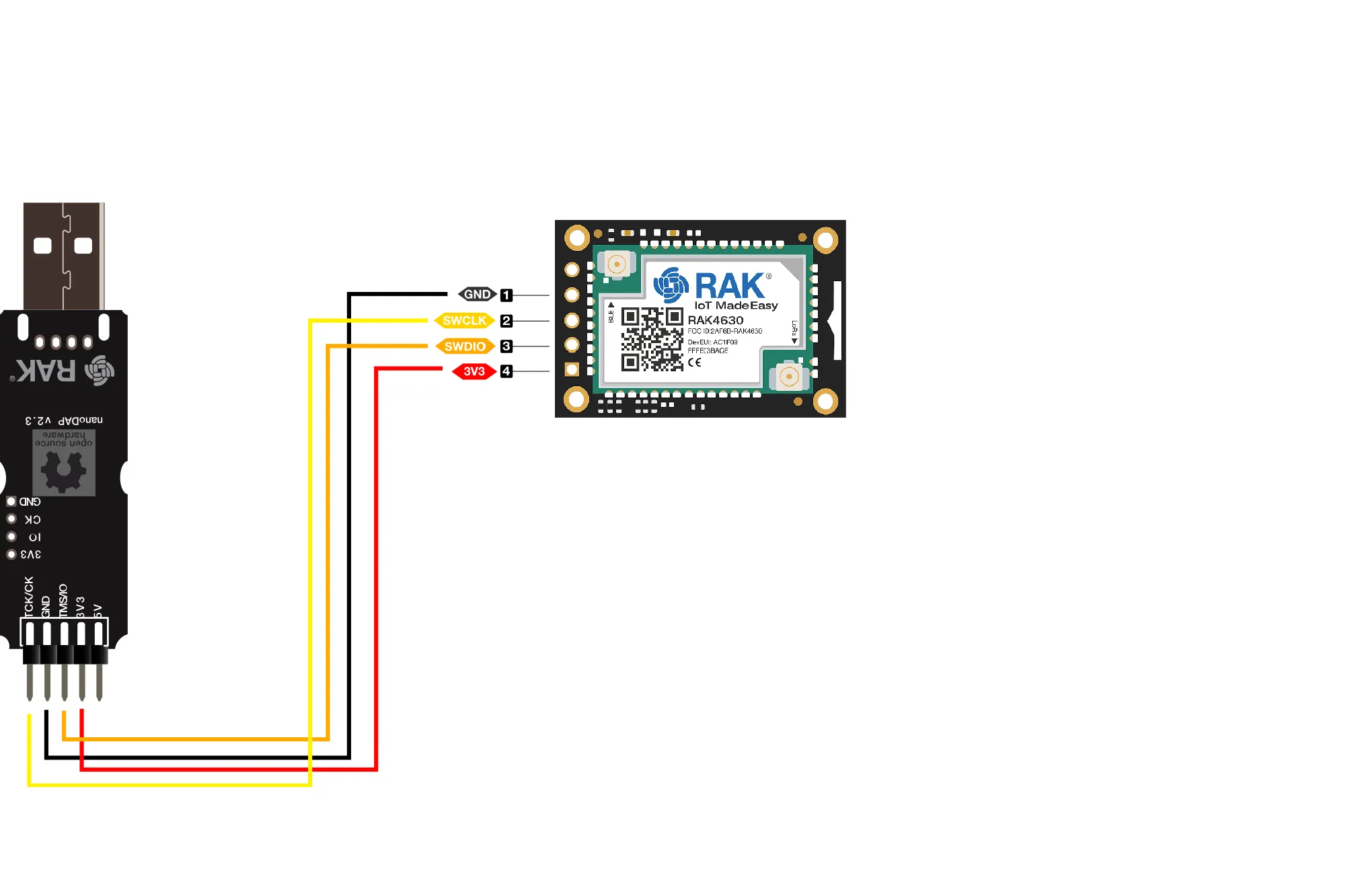
- Flash the bootloader
pyocd flash -t nrf52840 .\wiscore_rak4631_board_bootloader-0.4.4_s140_6.1.1.hex
- Continue with the normal flashing instructions